.webp "PDF Editing Options: Cloud vs Local Performance")

The first time I weighed cloud tools against local software for PDF editing, I was struck by how much the decision changes everything - privacy, workflow, even how much control you really have.
Digging into both options, I started to notice the pros and cons popping up in daily life. Some things felt faster, others riskier, and honestly, it’s not a one-size-fits-all choice.
Here’s what I’ve noticed and learned along the way, so you can tackle your own document work with more confidence, without losing sleep over shielding or speed.
1. Security: Threat Surfaces
Online PDF Editing
When you process PDFs in the cloud, you’re handing your files off to someone else’s computers. Now, safety isn’t just “their problem” or “my problem”, it’s something we both own. The provider protects servers, but I’m on the hook for who gets in, how things are set up, and who can see it.
Cloud Landscape
Let’s be real: the risks in such environments are huge, and the numbers back that up.
- The 2024 Thales Study says 44% of organizations had cloud breaches. Most of the time, it’s because people messed up settings or botched user management.
- The Cloud Alliance’s 2024 report points straight at insecure APIs, bad configurations, and sloppy access as the big dangers.
- According to the 2025 AstralGuard Benchmark, 78% of breaches come down to misconfigured storage, identity, or compute. That’s nearly eight out of ten.
All these reports hammer home the same point: most cloud disasters start with someone getting the settings wrong.
Cryptographic Controls & Data Handling
When I size up a web app, I look for strong protections - nothing less.
- Transport Encryption: TLS 1.2 or 1.3, no excuses.
- At-Rest Encryption: AES-256 or something just as tough.
- Management: Can I use my own key, or do I have to trust theirs?
- Retention and Deletion: Do the files stick around after I finish, or are they wiped?
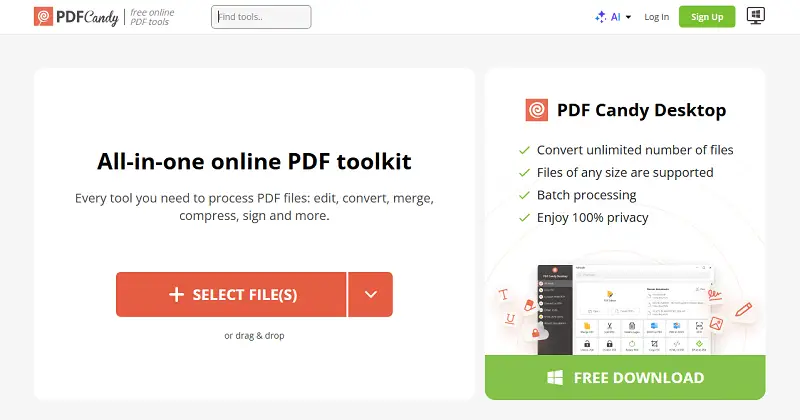
Take PDF Candy, for example. They employ AES-256, follow GDPR rules, and promise to delete items within two hours after you’re done.
Zero-Trust Requirements
The old days of "believe but verify" are gone - now it’s "rely on nothing, check everything, all the time". Studies say zero-trust can cut incidents by up to 40%, though it does mean some extra work to set it up.
So, for cloud online PDF editing, you need:
- MFA, always on
- Least-privilege for identity and access
- Real logging - track each issue
- Segmented workloads, so one breach doesn’t bring down the whole house
- Policy and Infrastructure-as-Code pipelines, to keep configs tight and catch drift before it bites you
Local PDF Editor
Processing papers on PC ensures documents remain under physical or logical supervision. I don’t have to rely on outside clouds or send sensitive stuff anywhere else. It’s the best way to verify all data stays mine.
Advantages
- Info Stays Home: Every piece of hardware I own or manage is applied.
- My Encryption, My Rules: I get to decide how I protect the papers, maybe with HSMs, TPMs, or some good old client-side crypto.
- True Isolation: If I need to, I can store the most sensitive work on air-gapped or tightly controlled networks.
- Security on Your Terms: I set the schedule for updates, backups, and even how long I retain files around.
What to Watch Out For
- Malware’s a Threat: If the system gets hit, the materials are in the line of fire.
- Maintenance Headaches: I have to stay on top of patches for both my OS and any apps I use.
- Limited by Gear: How well things run depends on my own hardware - CPU, RAM, and storage speed.
- Backup’s on Me: If I slack off and the device fails, I could lose everything.
PC PDF editor gives me the power and privacy, but I’ve got to stay sharp if I want to maintain it that way.
2. Performance: Throughput, Latency, and Scalability
Cloud Service
Online solutions are super flexible, but their success depends on your internet connection.
Advantages
- Device-Agnostic Access: I can jump onto any device with a browser and pick up where I left off.
- Elastic Compute: When I’m tackling big OCR jobs or conversions, the cloud throws extra power at the problem.
- Automatic Updates: No more chasing down patches or worrying about outdated software.
- Collaboration Features: Real-life annotation, shared editing, and sending someone a link - so much easier.
Constraints
- Latency: Huge PDFs take forever to upload if your connection’s slow.
- Throttling: Free accounts hit speed bumps or size caps pretty quickly.
- Service Queues: Sometimes, your document just sits there, waiting its turn.
- Connectivity Requirement: If the internet drops, all activity grinds to a halt.
Honestly, editing PDF online is a dream for teams spread out across different places. But if you’re dealing with massive files or your network’s unreliable, things can get bogged down fast.
Local
Edit PDF on desktop if consistent performance for heavy-duty piles is a must.
Benefits
- Immediate Response: No need to upload or download.
- Batch Efficiency: With scripts or command-line tools, I can churn through thousands of files swiftly.
- Offline Capability: It doesn’t matter if the Wi-Fi’s out, everything continues running.
- Deterministic IO: Fast SSDs and local caches make processing a breeze.
Scaling Locally
This requires hardware investment but ensures predictable execution without bottlenecks.
3. Governance: Compliance, Auditing, and Oversight
Online Service
Cloud PDF editors are not only convenient - it brings extra rules to the table.
Advantages
- IAM Policies: Set up role-based permissions, turn on MFA, keep a close eye on session controls.
- Audit Logs: You get exportable logs ready for your SIEM - Splunk, ELK, Sentinel, whatever you use.
- Lifecycle Management: Stick to retention schedules and guarantee secure deletion when it’s time.
- Compliance Requirements: GDPR, SOC 2, ISO 27001, HIPAA - the right framework depends on your workload.
- Jurisdiction Transparency: You need to know exactly where your info lives, not just the country, but the region.
- Vendor Lock-In Mitigation: Make sure you can grab your files and metadata, no strings attached.
Local
Managing docs onsite gives you total autonomy, but you definitely have to remain alert.
Measures
- Hook up AD/LDAP to handle permissions.
- Use a DMS or snapshots for versioning.
- Follow a schedule for saving or deleting files.
- Keep backups encrypted and redundant, and actually test your restores.
- Build out clear workflows for incident response.
Such setups only work when you’re serious about your policies and never let audits slide.
Conclusion
I’ve spent some time weighing cloud-based versus local PDF editing, looking at security, speed, and control.
Here’s what I’ve learned: Online platforms are unbeatable when I need quick access, flexibility, or to work with people scattered across different locations. But when it comes to protecting sensitive data and creating a predictable environment, nothing beats PC tools. They give me full ownership.
So, what’s the trick? I match my approach to the job. I look at how sensitive the documents are, what risks I’m willing to take, and what I need from my workflow. Sometimes that means using both options tools together. That way, I prioritize security without slowing myself down.