(1)(1).webp "Smarter OCR: AI and the Future of Searchable PDFs")

The first time I tried OCR tools, honestly, it felt like magic. Scanned pages would turn into text I could edit.
But it didn’t take long before the flaws started showing - words twisted into nonsense, weird formatting, whole chunks missing. Sometimes, I’d just give up trying to search for anything.
Then AI swept in and flipped everything on its head. It understands the context, picks up on language quirks, even figures out how a document is put together.
In this article, I’m diving into how all this new tech makes OCR more accurate and beginner-friendly.
Why Smarter OCR Matters?
When text is trapped in an image, it might as well be invisible. You can’t index or analyze it - at least, not without converting it first. This bottleneck slows totality down, no matter the industry.
- Searchability: A scanned agreement without embedded text cannot appear in database queries.
- Accessibility: Screen readers are incapable of interpreting bitmap content, excluding visually impaired users from critical documents.
- Compliance: Legal, financial, and healthcare sectors require retrievable, traceable records under strict archival mandates.
Look at the numbers. The global optical character recognition market is booming - analysts see it hitting the billions. Why? More companies are jumping on board with intelligent material processing and data automation.
From Templates to Deep Understanding
Old-school OCR tools were all about template matching. Basically, you’d compare what you saw on the page to a library of known letter shapes.
The problem? Real-world article isn’t that neat. Blur, weird angles, messy handwriting, even a funky font, any of that would throw template matching off, fast.
Contemporary character recognition engines, however, rely on deep learning architectures combining convolutional neural networks (CNNs) for feature extraction with sequence-to-sequence decoders that model linguistic dependencies.
Benchmarks back this up. CNN-Seq2Seq systems, especially the ones with attention mechanisms, crank out state-of-the-art rates on all sorts of datasets.
But there’s another level. Context-aware models take things further. They don’t look at every line in isolation, but pull in semantics, layout, syntax, the works. These spot connections between blocks, find structure, and even guess missing words when the page is a mess.
Anatomy of an AI-Enhanced OCR Pipeline
A robust PDF text recognition workflow involves multiple interdependent stages, each improved by modern machine learning.
Stage 1: Image Acquisition
Start with a clear picture. That’s everything.
- Resolution. Go for 300 DPI if you’re scanning printed text. For older or delicate pages, crank it up to 600 DPI.
- De-skewing and perspective correction. Neural boundary detectors step in to straighten pages that come in crooked or at weird angles.
- Noise reduction. AI-driven filters scrub out shadows, smudges, or scanner glare.
- Contrast normalization. Levels out lighting and revives faded backgrounds.
Even quick fixes can make a huge difference in what the system can read.
Stage 2: Structural Analysis
This is the cognitive core of PDF OCR.
Modern engines run on two networks at once:
- Text recognizers - these algorithms swallow huge multilingual datasets and spit out character sequences.
- Layout interpreters - using transformer classifiers, they piece together the structure: columns, captions, tables.
Instead of dumping plain text, the OCR technology builds a map: logical reading order, bounding boxes, and labels for surroundings.
The end result? A scannable PDF that actually works like a normal document. You can copy or index the content and the original look stays intact.
Stage 3: Post-Processing
Once you’ve got the raw text, AI steps back in to clean up and verify:
- Contextual spelling correction. Language models catch typos and weird word choices.
- Named Entity Recognition (NER). Pulls out things like company names, invoice numbers, or totals.
- Domain-specific validation. Checks if numbers, dates, or other fields fit the rules, and flags anything off.
This layer is where automation meets real-world accountability. Now you have verifiable data you can trust for analytics, audits, or plugging into enterprise systems.
Stage 4: Export searchable PDF
After everything is verified, the system locks the text layer onto the PDF.
- Coordinate mapping lines up the recognized text exactly where it belongs over the original image, so nothing looks out of place.
- Metadata - author, language, title - gets embedded for accessibility tools, following standards like PDF/UA.
You end up with a document that acts like it was born digital, not just photocopied and forgotten.
Where AI Excels?
Artificial intelligence elevates PDF text recognition far beyond classical limits:
- Handwriting. Train a network on loads of manual samples, and suddenly it can read messy cursive or old manuscripts that used to stump experts.
- Tables. With layout-aware transformers, AI grasps where the grid lines are and matches up the cells, so you get clean exports straight into CSV or spreadsheets.
- Mobile Photography. Ever snapped a quick shot of a document? AI-powered denoisers can turn those blurry pictures into sharp, searchable PDFs.
- Multilingual Settings. One model, many orthographies: Latin, Cyrillic, Arabic, Chinese, Japanese. It handles mixed languages and jumbled functions without breaking a sweat.
OCR Software
My toolkit is all about finding the right balance between flexibility and scale.
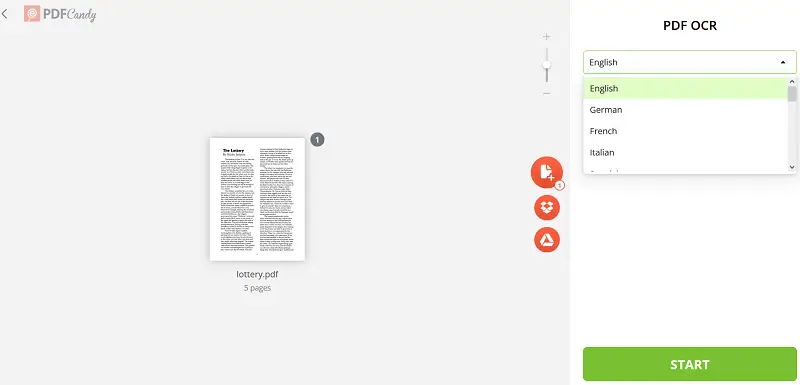
When I need to convert something fast I usually fire up PDF Candy. It runs right in the browser, does OCR in several languages, and spits out searchable PDFs. I don’t have to install anything or mess with settings. It’s quick and works really well for team projects where everyone needs access.
But if I’m dealing with bigger jobs or enterprise-level stuff, I go with Tesseract OCR hooked into custom Python snippets, or sometimes cloud APIs that send back details as JSON.
That way, I can automate the whole process, handle tons of files at once, and plug everything straight into management systems.
The Future: LLMs and Multimodal Reasoning
The next leap merges OCR with large language models (LLMs) capable of semantic reasoning.
So, you don’t need to stop at transcribing a doc. These agents can pull out insights, summarize pages, or answer questions directly from scanned papers.
This all comes together thanks to multimodal AI. These algorithms don’t only look at the words - they take in the text, the layout, even the images on the page.
That means they can match captions to pictures, make sense of tables way better than before, and tag content based on semantic field, not just keywords.
As these tools keep evolving, OCR shifts from simple "recognize text in PDF" task to full-on document understanding.
Proven Best Practices
After years of trial and error, a few strategies work:
- Capture clearly. Get the lighting right and keep the resolution high when you scan or snap a photo.
- Automate normalization. Let algorithms handle cropping, alignment, and cleaning up the images.
- Leverage contextual recognition. Pick mechanisms that actually get the environment, both in language and visuals.
- Preserve originals. Always save your raw files. You’ll want them if you run better models down the line.
- Monitor metrics. Keep an eye on error rates, latency, and how much human effort you’re cutting out.
- Prioritize data security. Verify you’re storing sensitive files in the right place.
Every tweak here pushes the pipeline to be more reliable, no matter what kind of PDFs you throw at it.
Conclusion
OCR isn’t about turning images into text anymore. Now, with AI in the mix, these systems get what they’re reading. They keep the layout intact, pick up on meaning, and make files easier for everyone to access.
We’re finally teaching machines to understand documents, so every photo, receipt, or old newspaper can join the digital world as real, structured information.

(1).webp?w=420&h=184)